
Scramble Squares, Pt. 1/3: Constraint Programming
This is post 1 of a 3-post series on the Scramble Squares puzzle. This post introduces the puzzle and presents a constraint programming approach. Part 2 will address symmetry, and Part 3 will introduce a backtracking algorithm.
Courtesy of my great-aunt, a gripping puzzle called Scramble Squares made its way around my extended family this past holiday season. The rules are simple:
Unscramble the nine square pieces by perfectly matching the pictures on the squares' edges, forming a large square, as shown in the diagram. Can you unscramble the squares without scrambling your brain? Good luck!The rule pamphlet shows a 3-by-3 grid of square puzzle pieces like that shown in the banner image but with blank squares.
I took a turn at this puzzle, and after about 15 minutes of fumbling with the pieces, I determined that I would have more fun mathematically modeling the puzzle and solving it with a computer. So let’s get to it. The puzzle features 9 square tiles that must be arranged in a 3-by-3 grid. In the puzzle presented here, each edge of each tile features either the top or bottom half of 1 of 4 Pokemon. (The physical puzzle my family solved featured 4 different pictures of bears but was otherwise the same.) Each pair of adjacent edges must form a Pokemon with a matched top and bottom half. Of course, each tile may be rotated in 90-degree increments as needed. And that’s it – those are all the rules.
Model
We consider a puzzle of size ${n \times n}$. We denote the set of squares (i.e., puzzle pieces) as ${\mathcal{S} \in \{1, \ldots, n\}}$, the set of board positions as ${\mathcal{P} \in \{1, \ldots, n\}^2}$, and the set of possible square rotations as ${\mathcal{R} = \{0, 1, 2, 3\}}$, where ${r \in \mathcal{R}}$ represents a number of counterclockwise quarter-turns. The labels for (possibly rotated) square edges are denoted as ${\mathcal{E} = \{0, 1, 2, 3\}}$, with ${e=0}$ as right, ${e=1}$ as top, ${e=2}$ as left, and ${e=3}$ as bottom. As for what’s shown on the square edges, we denote the set of tokens (i.e., images) as $\mathcal{T}$ and the set of halves as ${\mathcal{H} = \{-,+\}}$. Two edges match if and only if they are different halves of the same image. Each square has a base orientation corresponding to rotation $r=0$. Relative to that orientation, we denote the type and half of the image on edge ${e \in \mathcal{E}}$ of square ${s \in \mathcal{S}}$ under ${r \in \mathcal{R}}$ rotations as $t_{s,e,r}$ and $h_{s,e,r}$, respectively. For each board position ${(i, j) \in \mathcal{P}}$ we introduce a domain variable ${s_{ij} \in \mathcal{S}}$ that represents which square is placed in that position and a domain variable ${r_{ij} \in \mathcal{R}}$ that represents how many times the square that position is rotated.
To ensure each square is placed in precisely one position, the $s_{ij}$ variables are subject to an all-different constraint:
Additionally, constraints that ensure the touching edges on adjacent squares match are imposed. To that end, we define the sets of allowed oriented horizontal and vertical adjacency tuples:
Intuitively, the above sets are compatibility lookup tables. A tuple ${(s_1, r_1, s_2, r_2) \in \mathcal{A}_{\mathrm{H}}}$ means that if tile $s_1$ is rotated by $r_1$ and tile $s_2$ is rotated by $r_2$, then $s_1$ can be placed immediately to the left of $s_2$: their touching edges have the same token type and opposite halves. Likewise, ${(s_1, r_1, s_2, r_2) \in \mathcal{A}_{\mathrm{V}}}$ means tile $s_1$ under $r_1$ rotations can be placed immediately above tile $s_2$ under $r_2$ rotations. Separating horizontal and vertical compatibility this way lets us encode all edge-matching conditions once in two finite sets and then enforce adjacency by simple membership constraints, the final model elements:
Implementation
The tiles of the puzzle we solve are shown below.
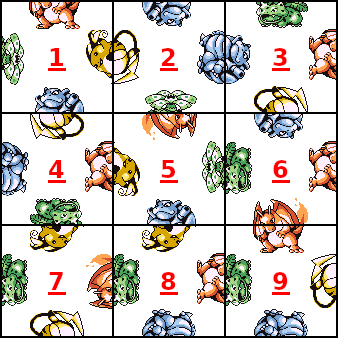
For the puzzle we discuss in this post, we store the input data in a YAML file with contents
1: [['ylw', '+'], ['red', '-'], ['grn', '+'], ['blu', '+']]
2: [['blu', '-'], ['blu', '+'], ['ylw', '-'], ['grn', '+']]
3: [['red', '-'], ['grn', '-'], ['blu', '+'], ['ylw', '-']]
4: [['red', '-'], ['ylw', '-'], ['blu', '-'], ['grn', '-']]
5: [['grn', '+'], ['red', '+'], ['ylw', '+'], ['blu', '+']]
6: [['red', '-'], ['blu', '+'], ['grn', '-'], ['red', '+']]
7: [['red', '+'], ['ylw', '+'], ['grn', '-'], ['ylw', '-']]
8: [['red', '-'], ['ylw', '+'], ['grn', '-'], ['blu', '-']]
9: [['ylw', '-'], ['red', '-'], ['grn', '-'], ['blu', '-']]
The keys in this file are an enumeration of the tiles, and the values specify the symbols on the
tiles’ edges. Each edge is represented as a tuple. The first element in the tuple is a color that
corresponds to one of the Pokemon and the second element is either $+$ to indicate that the edge
features the top half of the Pokemon or $-$ to indicate it features the bottom. The edge order
establishes the right, top, left, and bottom edges when the tile is under no rotation; this is
exactly the base-orientation data used in the formulation. In particular, for tile $s$ and edge
$e$, the YAML value at index $e$ defines $(t_{s,e,0}, h_{s,e,0})$. Values for rotated tiles are
then induced by the rotation index $r$ via edge relabeling, i.e.,
$$
\begin{equation}
(t_{s,e,r}, h_{s,e,r})
= (t_{s,(e-r) \bmod 4,0}, h_{s,(e-r) \bmod 4,0}).
\end{equation}
$$
Images illustrating
these features are stored in PNG files 1.png, 2.png, …, 9.png. The code I introduce below
expects the YAML file and PNG files for a particular puzzle to reside in a directory called
{puzzle}/input/ where {puzzle} represents a text label for the puzzle. For the puzzle in this
post, this is puzzles/3x3-original/input/.
For each of the 9 grid cells, one must select a tile to place there as well as its rotation. As
such, there are a total of 18 decisions to make. We introduce a file called common.py (“common”
because it contains code that is used throughout the posts in this series), we define a class
for a puzzle Solution, a function for drawing the puzzle tiles in an unsolved state, and a function
for loading the data in tile_dict.yaml for a given puzzle:
from itertools import product

import yaml
from PIL import Image, ImageOps


class Solution:

    def __init__(self, tile_vals, rotation_vals, case):
        self.tile_vals = tile_vals
        self.rotation_vals = rotation_vals
        self.n = int(len(tile_vals) ** 0.5)
        self.case = case

    def __str__(self):
        s = ''
        for (i, j) in product(range(1, self.n + 1), repeat=2):
            s += f'[t={self.tile_vals[i, j]},r={self.rotation_vals[i, j]}]'
            s += ' ' if j != self.n else '\n'
        return s

    def draw(self):
        # define tile size in pixels
        img_number = Image.open(f'{self.case}/input/1.png')
        pixels = img_number.size[0]
        # create an empty canvas
        canvas = Image.new(
            'RGBA',
            (pixels * self.n, pixels * self.n),
            (255, 255, 255, 255)
        )
        # paste each tile to the canvas in a manner consistent
        # with the solution
        for (i, j) in product(range(1, self.n + 1), repeat=2):
            tile = self.tile_vals[i, j]
            rotation = self.rotation_vals[i, j]
            img_number = Image.open(f'{self.case}/input/{tile}.png')
            img_number = img_number.rotate(rotation * 90)
            canvas.paste(
                img_number,
                (pixels * (j - 1), pixels * (i - 1)),
                mask=img_number.split()[3]
            )
        return ImageOps.expand(canvas, border=1, fill='black')


def draw_input(case):
    # open the tile data
    tile_dict = load_tile_dict(case)
    # define tile size in pixels
    img_number = Image.open(f'{case}/input/1.png')
    pixels = img_number.size[0]
    # define the puzzle dimension
    n = int(len(tile_dict) ** 0.5)
    # create an empty canvas
    canvas = Image.new(
        'RGBA',
        (pixels * n, pixels * n),
        (255, 255, 255, 255)
    )
    # paste each tile to the canvas
    for number, _ in tile_dict.items():
        i, j = divmod(number - 1, n)
        img_number = Image.open(f'{case}/input/{number}.png')
        canvas.paste(
            img_number,
            (pixels * j, pixels * i),
            mask=img_number.split()[3]
        )
    return ImageOps.expand(canvas, border=1, fill='black')


def load_tile_dict(case):
    with open(f'{case}/input/tile_dict.yaml', encoding='utf-8') as fh:
        tile_dict = yaml.load(fh, Loader=yaml.Loader)
    for key, val in tile_dict.items():
        tile_dict[key] = list(map(tuple, val))
    return tile_dict
Note above that the Solution class features methods for rendering the solution as a string and
as an image. We load this code in a separate file called naive.py that contains the code required
to model and identify all solutions of the puzzle:
from itertools import product, permutations

from ortools.sat.python.cp_model import CpModel, CpSolverSolutionCallback

from common import Solution, load_tile_dict


def build_instance(case):

    tile_dict = load_tile_dict(case)
    tiles = set(tile_dict.keys())
    rotations = {0, 1, 2, 3}
    n = int(len(tiles) ** 0.5)
    positions = set(product(range(1, n + 1), repeat=2))

    # initialize a model
    model = CpModel()

    # for each position, there are two variables:
    # - one that represents the tile placed in the position
    # - another to represent the rotation of that tile
    #   (counterclockwise 90-degree turns from base orientation)
    tile_vars = {(i, j): model.NewIntVar(1, max(tiles), f'tile_{i,j}')
                 for (i, j) in positions}
    rotation_vars = {(i, j): model.NewIntVar(0, 3, f'rotation_{i,j}')
                     for (i, j) in positions}

    # each piece is used exactly once
    model.AddAllDifferent(tile_vars.values())

    # helper function
    def side_of_rotated_tile(t, r, s):
        return tile_dict[t][(s - r) % 4]

    # ensure left-right neighbors match sides
    tuples_list = []
    for t1, t2 in permutations(tiles, r=2):
        for r1, r2 in product(rotations, repeat=2):
            side1 = tile_dict[t1][(0 - r1) % 4]
            side2 = tile_dict[t2][(2 - r2) % 4]
            side1 = side_of_rotated_tile(t1, r1, 0) # right side of left tile
            side2 = side_of_rotated_tile(t2, r2, 2) # left side of right tile
            if side1[0] == side2[0] and side1[1] != side2[1]:
                tuples_list.append((t1, r1, t2, r2))
    for (i, j) in positions:
        if (i, j + 1) in positions:
            variables = [tile_vars[i, j], rotation_vars[i, j],
                         tile_vars[i, j + 1], rotation_vars[i, j + 1]]
            model.AddAllowedAssignments(variables, tuples_list)

    # ensure top-bottom neighbors match sides
    tuples_list = []
    for t1, t2 in permutations(tiles, r=2):
        for r1, r2 in product(rotations, repeat=2):
            side1 = side_of_rotated_tile(t1, r1, 3) # bottom side of top tile
            side2 = side_of_rotated_tile(t2, r2, 1) # top side of bottom tile
            if side1[0] == side2[0] and side1[1] != side2[1]:
                tuples_list.append((t1, r1, t2, r2))
    for (i, j) in positions:
        if (i + 1, j) in positions:
            variables = [tile_vars[i, j], rotation_vars[i, j],
                         tile_vars[i + 1, j], rotation_vars[i + 1, j]]
            model.AddAllowedAssignments(variables, tuples_list)

    return model, tile_vars, rotation_vars


class SolutionCallback(CpSolverSolutionCallback):

    def __init__(self, tile_vars, rotation_vars, case):
        CpSolverSolutionCallback.__init__(self)
        self.tile_vars = tile_vars
        self.rotation_vars = rotation_vars
        self.solutions = set()
        self.case = case

    def OnSolutionCallback(self):
        tile_vals = {(i, j): self.Value(self.tile_vars[i, j])
                     for (i, j) in sorted(self.tile_vars.keys())}
        rotation_vals = {(i, j): self.Value(self.rotation_vars[i, j])
                         for (i, j) in sorted(self.rotation_vars.keys())}
        self.solutions.add(Solution(tile_vals, rotation_vals, self.case))
In naive.py, there is one function called build_instance that builds a model of the puzzle
using Google OR-Tools’ constraint programming (CP) objects, and there is an accompanying callback
that builds and stores one Solution object per solution identified by OR-Tools’ CP solver.
To build the model, the code first loads the data from tile_dict.yaml. Based on the puzzle size,
it then creates one set of variables to represent which tile is placed in each grid cell and
another set to represent how the tile in each grid cell $(i, j)$
is rotated. These variable are instantiated as domain variables. That is, each tile variable
takes an integer value between 1 and $n$ where $n$ is the number of tiles,
and each rotation variable takes an integer value between 0 to 3 that represents the number of
90-degree counter-clockwise turns to apply to the tile.
import shutil
from pathlib import Path

from ortools.sat.python.cp_model import CpSolver

from common import draw_input
from naive import SolutionCallback, build_instance


case = Path('puzzles/3x3-original')
case_output = case / 'output' / 'symmetry'
if case_output.exists() and case_output.is_dir():
    shutil.rmtree(case_output)
case_output.mkdir(parents=True)
canvas = draw_input(case)
canvas.show()
canvas.save(f'{case_output}/unsolved.png')

instance, tile_vars, rotation_vars = build_instance(case)
solver = CpSolver()
solver.parameters.enumerate_all_solutions = True
cb = SolutionCallback(tile_vars, rotation_vars, case)
solver.Solve(instance, cb)

for i, sol in enumerate(cb.solutions, start=1):
    print(f'=== Solution: {i} ===')
    print(sol)
    with open(f'{case_output}/{i}.txt', 'w', encoding='utf-8') as fh:
        fh.write(str(sol))
    canvas = sol.draw()
    canvas.show()
    canvas.save(f'{case_output}/{i}.png')
Solutions
Running the solver with enumerate_all_solutions = True yields four solutions, shown below.
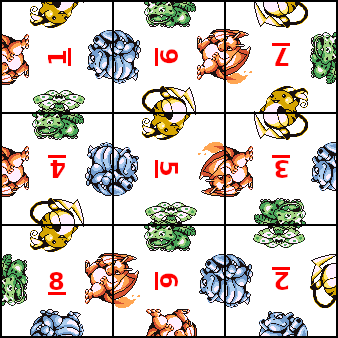 |
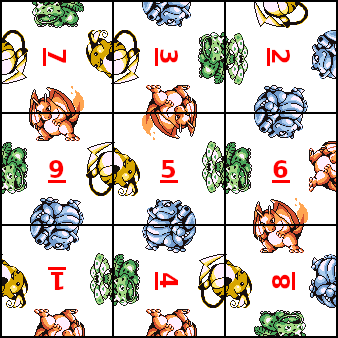 |
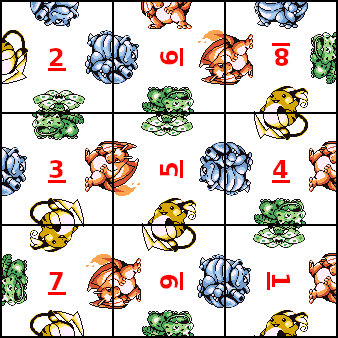 |
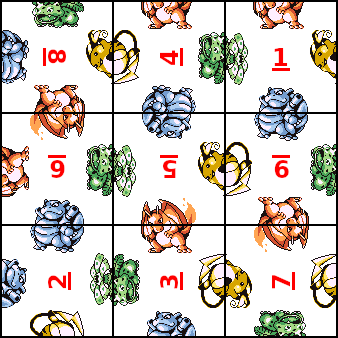 |
A close look reveals that all four solutions are actually 90° rotations of one another. In other words, the solver found just one essentially unique arrangement – one isomorphism (a structure that is the same up to a relabeling or transformation, here a rotation of the whole board) – returned four times due to the rotational symmetry of the board. This raises a natural question: can we reformulate the model in a way that makes only one representative from each isomorphism class feasible? That question is the subject of Part 2.

You May Also Like
Simplex/Transformation Animation from INFORMS 2024 Annual Meeting Presentation
In this post, I provide the code for producing the animation above, …
The Mixed Integer 0-1 Knapsack Problem
Note: Thanks to Shraddha Ghatkar for pointing out an error in my …

The 0-1 Knapsack Problem, Revisited
When I first started this blog in 2019, one of my first posts was …